NVIDIA RTX, GeForce NOW and Jetson: Tools for Gaming, Creation and Robotics
- Gate
- Machine Learning
- Departs
- Crew
- NVIDIA Writers
- Passengers
- 918
NVIDIA’s gaming, creative and Jetson tools span local PCs, cloud play and robotics projects that process camera and sensor data on-device.
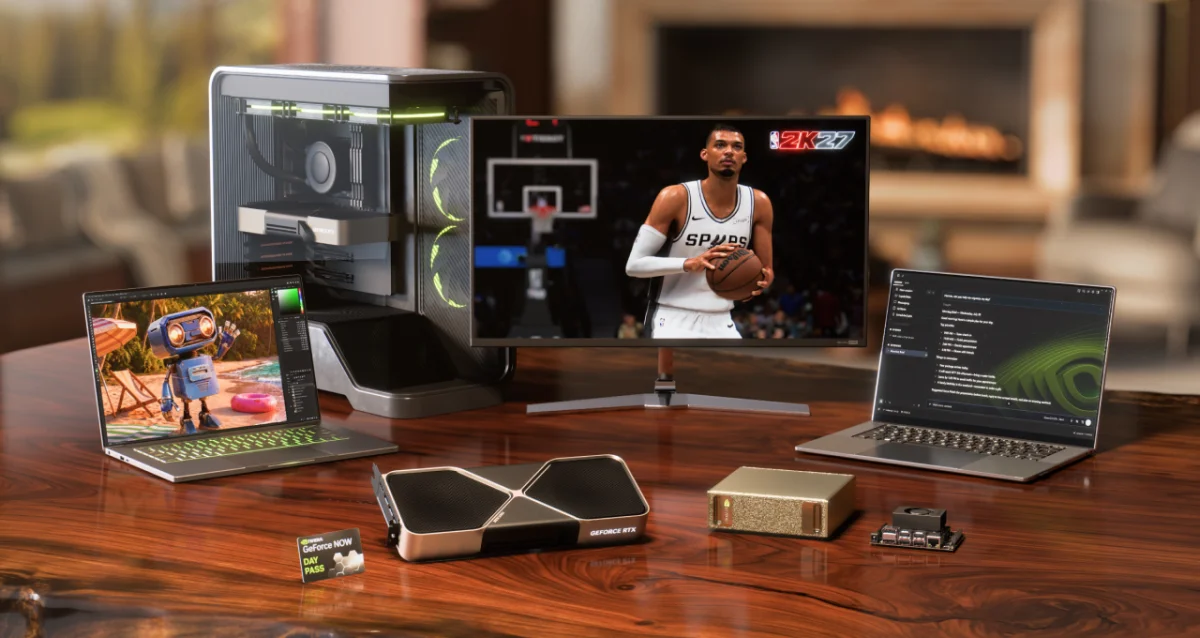
NVIDIA’s holiday lineup points to three different ways to use its hardware and software: play games on a PC or through the cloud, speed up creative work, or build a robot that can interpret its surroundings. The practical choice depends on where the work runs. Gaming can happen on a desktop, laptop or supported streaming device; creative workflows rely on compatible applications; and Jetson projects put AI processing on compact hardware near the robot’s cameras and sensors.
Gaming across PCs and the cloud
For PC gaming, GeForce RTX 50 Series desktops and laptops use NVIDIA’s Blackwell architecture, fifth-generation Tensor Cores and fourth-generation RT Cores. Those components support AI-enhanced graphics and ray tracing, as well as high frame rates. The exact experience depends on the game, system configuration and supported features, so the product family alone doesn’t specify a performance level for every title.
RTX Spark PCs take a different approach, combining RTX graphics and NVIDIA’s AI platform on a single superchip. The company describes them as slim laptops and compact desktops running Windows, intended to cover gaming, creative workloads and local AI. That range may suit people who want one machine for several kinds of work; the source doesn’t provide benchmark results or detailed configuration comparisons for these systems.
On supported games, DLSS 5 is presented as a way to increase performance and improve image quality. Its DLSS 3D-Guided Neural Rendering feature is described as adding lifelike lighting and materials to game scenes. NVIDIA points to NBA 2K27 with DLSS 5 as an example. As with other rendering features, support in a particular game matters: players should check which titles include the technology before treating it as part of a system’s expected experience.
For responsiveness, NVIDIA Reflex reduces system latency in supported games. G-SYNC displays use variable refresh rates to smooth gameplay and reduce tearing. These tools address different parts of the experience: Reflex targets the delay between input and what appears on screen, while a compatible G-SYNC display adjusts its refresh timing.
GeForce NOW offers another route: stream supported games to compatible laptops, TVs, handhelds and other devices. Players can connect supported game stores and stream PC games they own. The service lists more than 4,500 available titles. Cloud play can make a library accessible across devices without relying on each one to run the game locally, though it depends on a compatible device, a supported title and an internet connection.
Creative work depends on application support
For creators, the proposed use cases range from editing holiday footage into a short film to making a 3D scene or livestreaming. GeForce RTX 50 Series and RTX Spark devices are positioned for those workloads, alongside NVIDIA Studio tools and AI acceleration.
NVIDIA Studio Drivers support video editing, 3D design and livestreaming. In applications that support the relevant acceleration, faster processing can shorten waits and leave more time for revisions and experimentation. That benefit depends on the software and workflow: a creator should check application support and hardware requirements before choosing a system. No specific editing times or benchmark comparisons are given here.
Jetson puts perception on the robot
Jetson projects shift the focus from rendering and content creation to sensing and action. A beginner might start with a camera that identifies a candy cane or gingerbread person, then test whether the system can still recognize it under changing lights or distinguish between two similar objects. These tests expose the limits of a model and provide concrete ways to refine a project.
The NVIDIA JetPack software development kit works with Jetson compact computers to support robotics, autonomous machines and other intelligent devices. A Jetson Developer Kit can be paired with cameras and sensors for experiments in computer vision, generative AI and multimodal robot control. Processing data directly on the device can support projects that respond to their immediate surroundings; Jetson modules offer a path from a prototype toward a production system.
Several examples show how those pieces can fit together. Microduck, using the NVIDIA Jetson Orin Nano Super, combines movement, visual understanding and natural-language interaction. Developers can explore how a spoken request might connect what a robot sees with an action, using Hermes Agent and NVIDIA Cosmos.
Another setup pairs an SO-101 robot arm with NVIDIA Jetson Orin. OpenClaw can receive a request, plan steps, use NVIDIA tools and check the result. OpenShell runs the agent in a sandbox that controls its access to models and robot tools. The system also uses ASPIRE skills, which reuse lessons from earlier attempts to guide later tasks. The practical challenge is making each stage work reliably: interpreting a request, choosing actions and confirming what happened.
A companion robot offers a related path. NVIDIA Nemotron 3.5 Bolt and Cosmos are described as open models that can run locally on Jetson Orin Nano 8GB, combining chat, movement and visual understanding. More advanced projects can explore vision-language-action and world-action models, which aim to connect natural-language instructions with planning and physical interaction. The next step for makers is to test how well those systems handle unfamiliar objects, changing conditions and multistep tasks. Setup guides and tutorials are available through Jetson AI Lab.
These tools cover distinct needs, from smoother PC play and streamed game libraries to accelerated creative software and local robot control. The most useful starting point is the intended workload: check game and application support for PC features, and identify the sensors, models and actions a robotics project needs before selecting its Jetson hardware.


