Cost-Effective Analytics Stack: Leveraging Modal, dlt, and dbt for Data Engineering Efficiency
- Gate
- Machine Learning
- Departs
- Crew
- Kenny Ning
- Passengers
- 665
This article outlines how to create a cost-efficient analytics stack using Modal, dlt, and dbt, highlighting data loading, transformation, and deployment strategies to save costs and streamline processes.
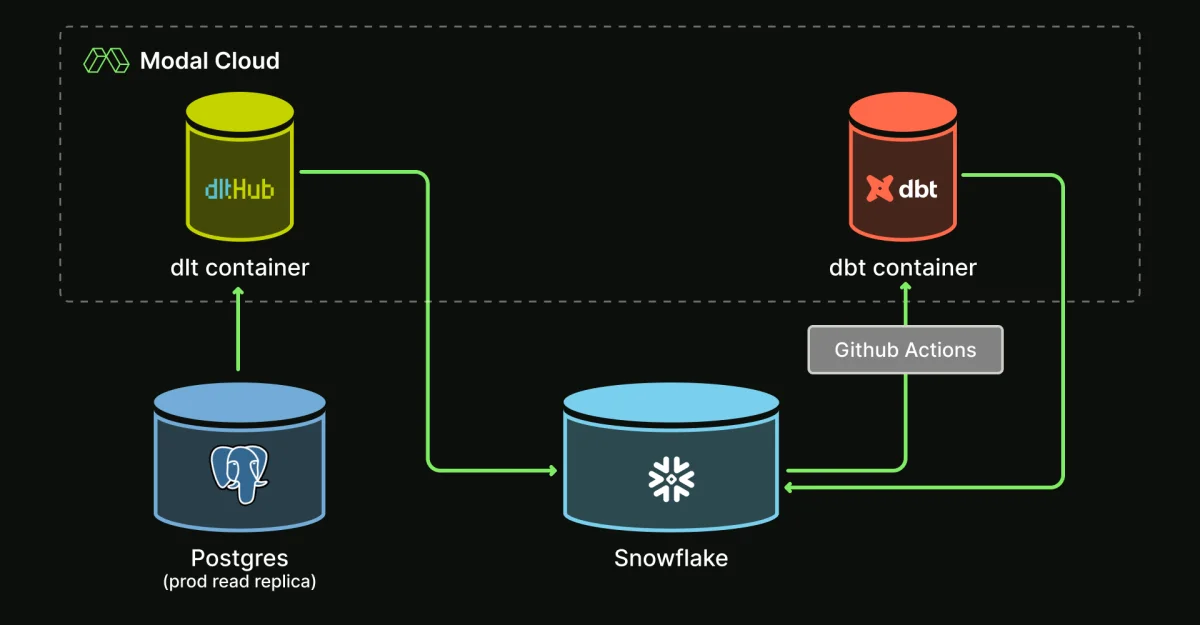
In the realm of data engineering, leveraging an efficient analytics stack is crucial for scalability and cost-effectiveness. This article discusses the integration of Modal, dlt, and dbt to create such a stack, substantially reducing operational costs and improving functionality in data management workflows.
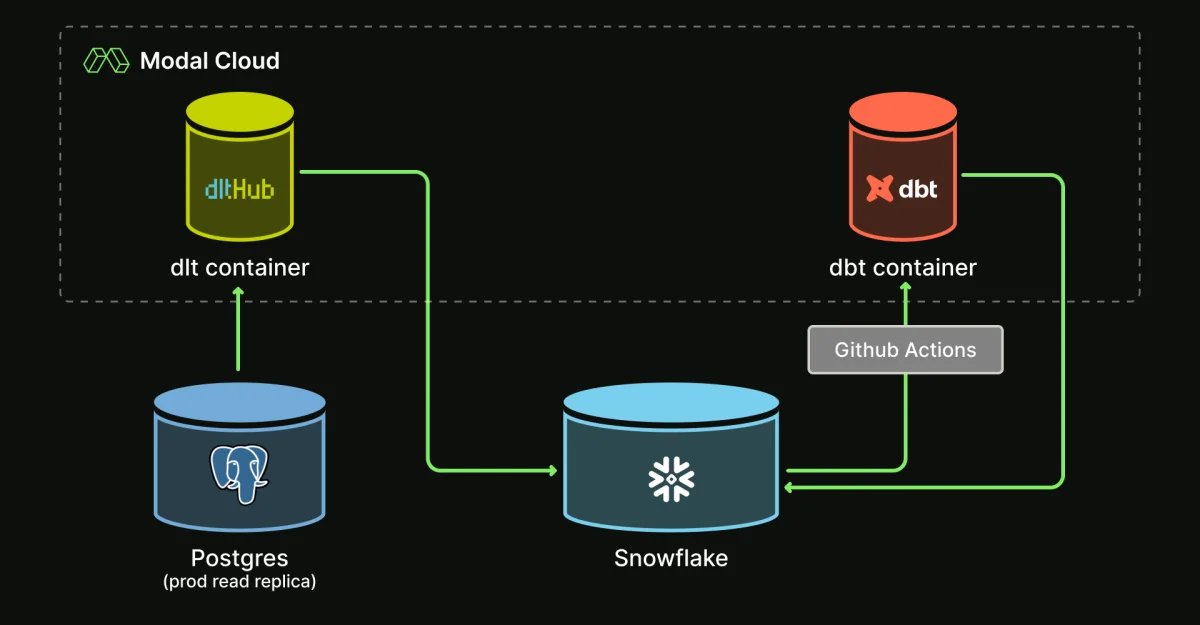
Overview of the Stack
The integration provides powerful functionalities that allow you to:
- Load data with dlt
- Transform it using dbt
- Manage continuous integration and continuous deployment (CI/CD) with GitHub Actions
Modal users have reported substantial savings, with some moving millions of rows for under $1 a day. The stack is built on open-source frameworks, ensuring community support and maintainability.
Project Structure
Understanding the organization of your project is key to leveraging the full capabilities of Modal, dlt, and dbt. Below is a snapshot of a typical project structure:
.github/workflows/
├── ci-cd.yml  # Manages auto deployment
dbt
├── models/  # dbt transformation code
├── build_dbt.py  # Run dbt via Python SDK for CI/CD
├── dbt_project.yml
├── modal_profiles.yml  # Contains Snowflake credentials for secure handling
└── packages.yml
dlt
├── clickhouse_pipeline.py
├── postgres_pipeline.py
└── sql_database/  # Helpers for dlt
.pre-commit-config.yml  # Contains linter configurations
cicd.py  # Manages deployment jobs on Modal
requirements.txt  # Python package requirements
Data Loading with dlt
A primary use case at Modal involves transferring data from a Postgres production read replica to Snowflake. Traditional vendor solutions like Fivetran become impractical for data volumes reaching millions of rows daily.
Initially, the approach utilized each database’s client SDK to fetch data, leading to significant boilerplate code challenges:
- Automatic schema inference: Snowflake requires schema definitions, which necessitated manual column and type specification—a labor-intensive process that was unsustainable.
- Snowflake DDL: A large amount of boilerplate was required for table creation and data insertion tasks.
- Incremental loading: Custom logic was developed for incremental updates resulting in potential errors and data duplication.
To address these challenges, the team adopted dlt, a Python library that simplifies data loading. The results were cleaner and more maintainable data loading code.
Implementing dlt on Modal
Here's a streamlined guide for deploying dlt to copy data from Postgres to Snowflake:
- Initialize the dlt SQL database setup using the following command:
- Define the Modal image to be used:
- Wrap the dlt loading function with Modal Function decorators, including necessary secrets and scheduling:
- Develop the dlt pipeline code:
dlt init sql_database snowflakeimport dlt
import modal
image = (
modal.Image.debian_slim()
.apt_install(["libpq-dev"]) # Required system dependency
.pip_install(
"sqlalchemy>=1.4",
"dlt[snowflake]>=0.4.11",
"psycopg2-binary",
"dlt[parquet]",
"psutil==6.0.0",
"connectorx",
)
)
app = modal.App("dlt-postgres-pipeline", image=image)@app.function(
secrets=[modal.Secret.from_name("snowflake-secret"), modal.Secret.from_name("postgres-read-replica-prod")],
schedule=modal.Cron("24 6 * * *"), # Daily execution
timeout=3000,
)
def load_table_from_database(table: str, incremental_col: str, dev: bool = False) -> None:pg_url = f'postgresql://{os.environ["PGUSER"]}:{os.environ["PGPASSWORD"]}@localhost:{os.environ["PGPORT"]}/{os.environ["PGDATABASE"]}'
snowflake_url = f'snowflake://{os.environ["SNOWFLAKE_USER"]}:{os.environ["SNOWFLAKE_PASSWORD"]}@{os.environ["SNOWFLAKE_ACCOUNT"]}/{os.environ["SNOWFLAKE_DATABASE"]}'
pipeline = dlt.pipeline(
pipeline_name="task",
destination=dlt.destinations.snowflake(snowflake_url),
dataset_name="POSTGRES_DLT",
progress="log"
)
# Create the database source
source_1 = sql_database(ConnectionStringCredentials(pg_url), backend="connectorx").with_resources("task")
source_1.task.apply_hints(incremental=dlt.sources.incremental("enqueued_at", initial_value=pendulum.datetime(2024, 7, 24, 0, 0, 0, tz="UTC")))
info = pipeline.run(source_1, write_disposition="merge") # Merge latest records
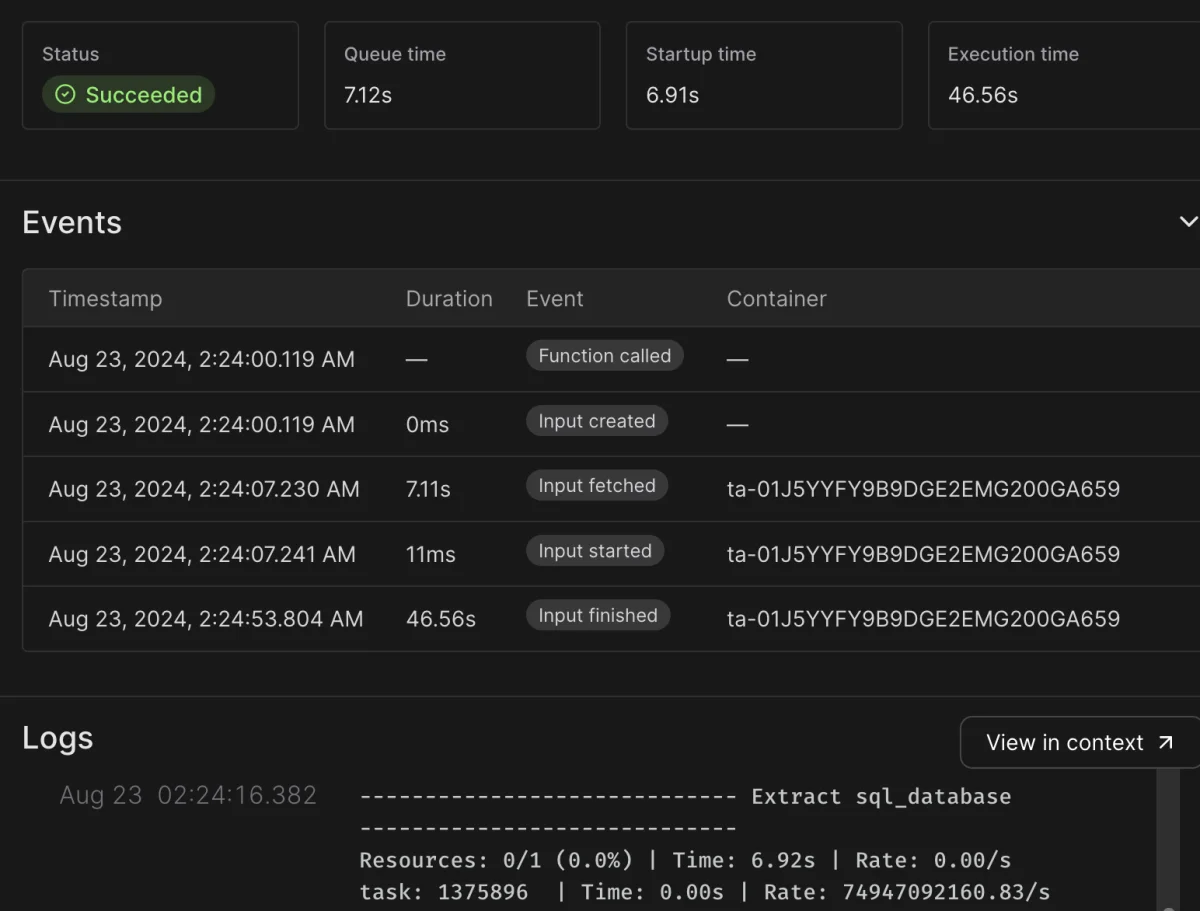
print(info)In a recent run, this process wrote 1,375,896 rows (~20MB) in just 47 seconds, illustrating notable efficiency.
Analysing costs shows that using Modal for transferring over 30 million rows a month is incredibly affordable: under $0.01, compared with $4,738 per month if using Fivetran.
Advanced Configuration
Modal Proxy: If your databases reside behind a private VPN, you might opt for Modal Proxy to access your data securely as a bastion server. It offers capabilities to maintain connectivity without exposing your assets unnecessarily.
Handling Deletes: As it stands, this initial system does not account for update or delete operations. However, dlt's capabilities include Postgres change data capture (CDC) features that could be leveraged for future enhancements.
Scaling Out: To increase efficiency, you can utilize Modal's starmap function to synchronize multiple tables concurrently, thereby reducing overall runtime:
@app.function(...)
def main(dev: bool = False):
    tables = [...]  # List of tables to load
    list(load_table_from_database.starmap(tables))
Transforming Data with dbt
Once data is loaded into Snowflake, transforming that data to be analysis-ready is next. dbt is the standard for transformation tasks within this context. The process usually starts with creating base models followed by activity models inspired by a defined schema.
The transformation steps involve:
- Creating a
basemodel for initial clean-up, structuring data for easier analytics. - Generating activity models where events associated with user activities are encapsulated, aiding in temporal analysis.
Each model should typically be materialized as a view to ensure up-to-date querying without unnecessary rebuilds. For example, the task table can be transformed as follows:
- Define a base model:
- Establish activity models:
select
    id as task_id,
    account_id as workspace_id,
    gpu_count,
    enqueued_at,
    started_at,
    finished_at
from {{ source('postgres_dlt', 'task') }}workspace_stream_started_task.sql:
select
workspace_id,
started_at as ts,
gpu_count
from {{ ref('base_prod__task') }}
workspace_stream_finished_task.sql:
select
workspace_id,
finished_at as ts,
gpu_count
from {{ ref('base_prod__task') }}This setup aids in easy event organization and monitoring of resources that might be reaching their concurrency limits, facilitating timely adjustments without service disruptions.
CI/CD Process with GitHub Actions
Managing deployments and ensuring continuous integration is facilitated via GitHub Actions. The CI/CD workflow triggers upon pushes to designated branches and can effectively handle multiple deployments:
name: CI/CD
on:
  push:
    branches:
      - main
  pull_request:

jobs:
  deploy:
    ...
    ...
This workflow supports the use of a script to automate the definitions and deployment steps, integrating seamlessly with the capabilities of Modal to allow for multiple application deployments within complex directory structures.
The script implements logic to parse Python files for deployment criteria, ensuring a streamlined deployment process without manual overhead. This method allows for precision and accuracy in managing complex ETL applications.
Conclusion
This integration of dlt, dbt, and Modal significantly abstracts away the repetitive boilerplate code typically required in traditional ETL tasks. By combining these tools, data engineers can enhance their productivity while cutting costs drastically. The clean, collaborative code environment allows for effective scaling as the demands of data operations grow, paving the way for better insights and data-driven decision-making.