Modal Sticky Sessions Keep Stateful Workloads on the Same Serverless Container
- Gate
- Machine Learning
- Departs
- Crew
- James Davis
- Passengers
- 514
Modal’s Sticky Sessions pin related requests to one container while scaling capacity by active sessions, supporting voice agents, shared rooms and games.
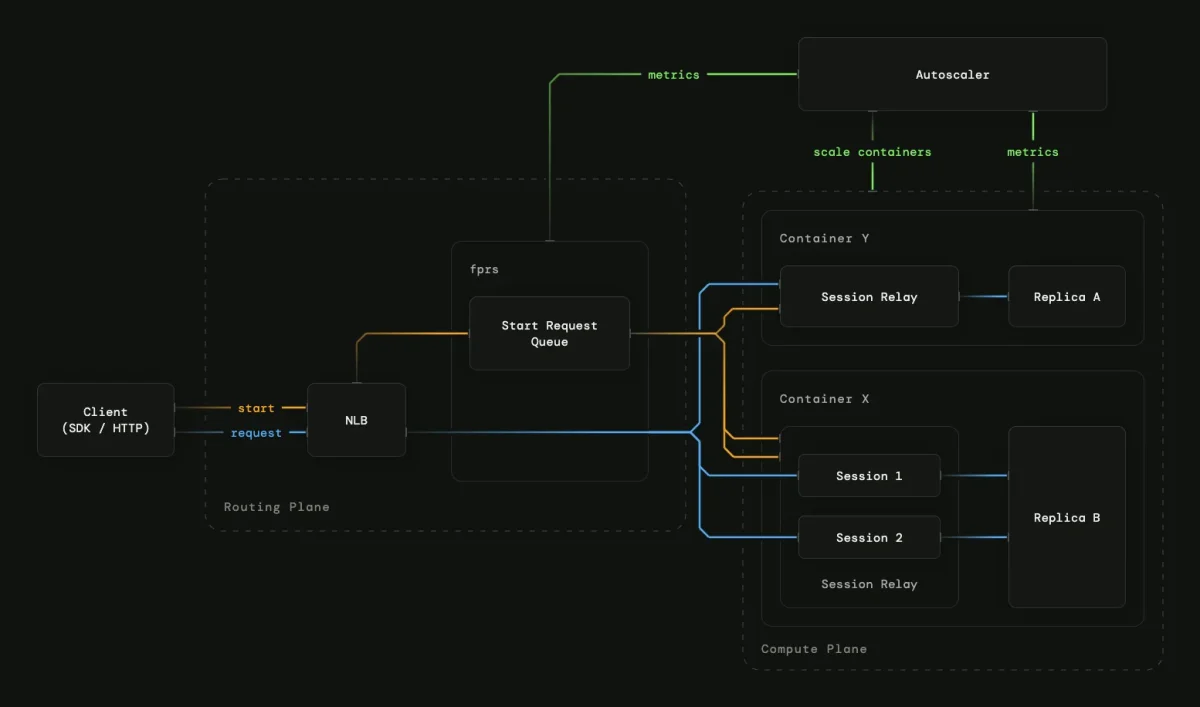
Serverless systems are built to spread independent requests across available compute. That model gets awkward when a workload carries state from one request to the next: a reconnecting voice call, a shared chat room or a multiplayer game may need to return to the same process. Modal’s Sticky Sessions add that continuity to its autoscaling serverless infrastructure, routing each session’s requests to one container and scaling the fleet around active sessions.
The feature is built on Modal Servers, which handle HTTP traffic, container lifecycles and scaling. Developers mark a server with the @modal.sessioned() decorator, then start sessions through the SDK or HTTP API. Each session has a configurable idle timeout; the example below starts one with a 600-second timeout and sends a request using its session token.
@app.server()
@modal.sessioned()
class Server:
    @modal.enter()
    def start(self):
        subprocess.Popen(["python", "-m", "http.server", "8000"])

@app.local_entrypoint()
def main():
    session = Server.sessions.start(idle_timeout=600)
    headers = {"Modal-Authorization": f"Bearer {session.token}"}
    print(requests.get(Server.get_url(), headers=headers).text)
Why request routing falls short
Modal already supports WebSockets through Web Functions, but a connection is associated with a Function input rather than a particular container. If the connection drops, reconnecting creates a new input that may be routed elsewhere. That can break applications whose state lives in the original process. Gradio and Streamlit interfaces, voice agents, streaming speech recognition and multiplayer games are among the workloads that can need a stronger link between a user session and its backend.
There are two existing approaches with different tradeoffs. Setting max_containers=1 can keep traffic on a single container, but gives up scaling. Modal Servers also offer best-effort affinity: requests carrying the same Modal-Affinity-Routing-Key are usually directed to the same container. That container can still be removed or replaced, however, so later requests may land elsewhere.
Sticky Sessions provide a stronger guarantee for the session’s lifetime: requests associated with a session are routed to its container. The model treats a session as a continuing unit of work, closer to a pipe between the client and the process than a series of unrelated requests. That requires the infrastructure to account for session identity and duration as well as request traffic.
Routing without a central session map
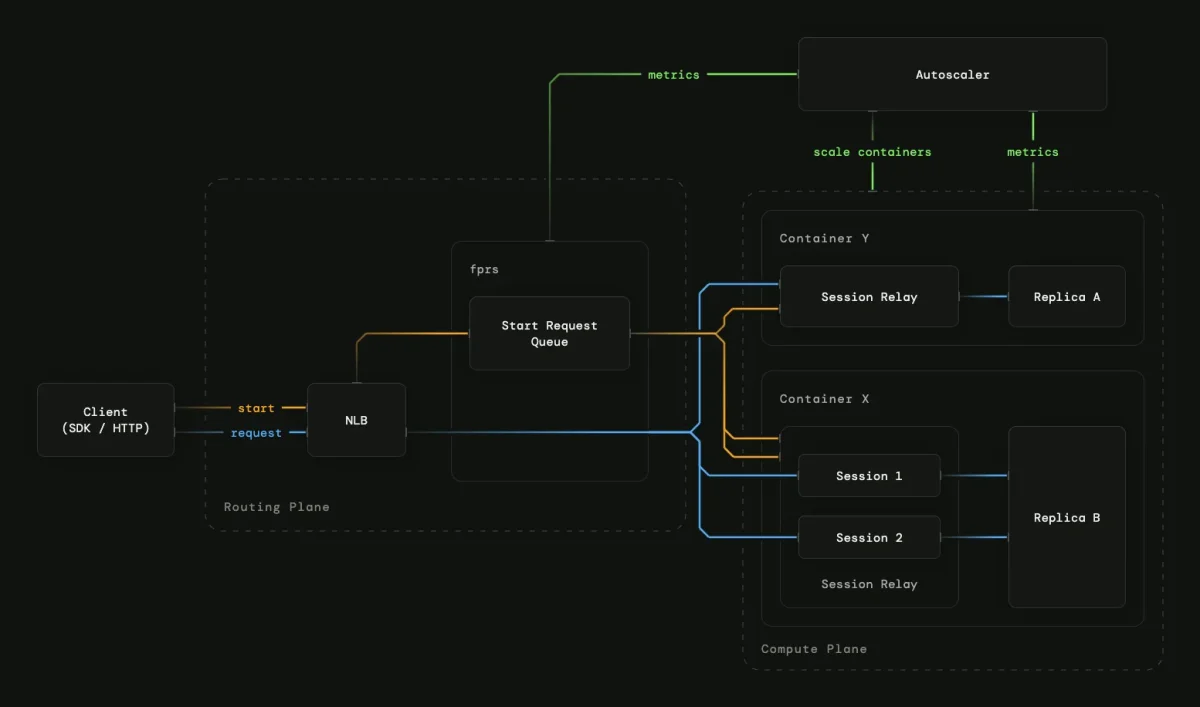
Modal’s Servers use an in-house stateless proxy, called fprs, for low-latency routing and load balancing. It keeps routing information in memory and reconciles that state from durable storage. For Sticky Sessions, the team says it avoided storing a session-to-container map in the proxy, which would need to stay consistent across replicas and restarts. Instead, routing metadata is encoded in a signed session token. Proxies validate the token and direct requests to the container that owns the session.
The token also provides a way to share access. By default, Modal Servers require Proxy Tokens, but a session can be shared without disabling that authentication or distributing a Proxy Token. The sessions.start() call returns a signed token for that session. Clients holding the same token can reach shared state, such as a room in a chat or game.
Because the session’s authoritative state belongs to its container, the load balancer doesn’t have an instant, global view of available capacity. Modal says its load balancers periodically probe containers for snapshots of available concurrency, then combine those results with recent routing decisions. The aim is to spread sessions across containers while avoiding unnecessary attempts to send work to a full one.
Scaling by active sessions
Traditional request-based autoscaling targets a desired level of request concurrency per container and assumes traffic can be redistributed across the fleet. That assumption works for stateless services, where any container can handle any request. With Sticky Sessions, traffic from an established session can’t simply move to a less busy container without losing the connection to its state.
Modal instead treats sessions as the concurrency unit. Operators can configure how many sessions a container handles at once. When a container reaches that limit, new sessions queue until an existing session ends or another container is ready. The autoscaler watches both active session counts and queued demand to adjust capacity. That means session duration and the number of concurrent rooms or calls shape scaling decisions, alongside incoming demand.
Workloads the feature supports
For voice agents, a WebRTC peer connection must remain associated with the process that holds it. Modal’s Phonon Voice Bot example uses Pipecat with Gradium Phonon text-to-speech; a Sticky Session keeps WebRTC signaling routed to the container with the peer connection and holds that container active while audio flows.
A shared chat room can use one session as its backing process. Clients with the session token reach the same container, where messages can be broadcast to the room. If a client disconnects, it can reconnect to that session while the room remains active.
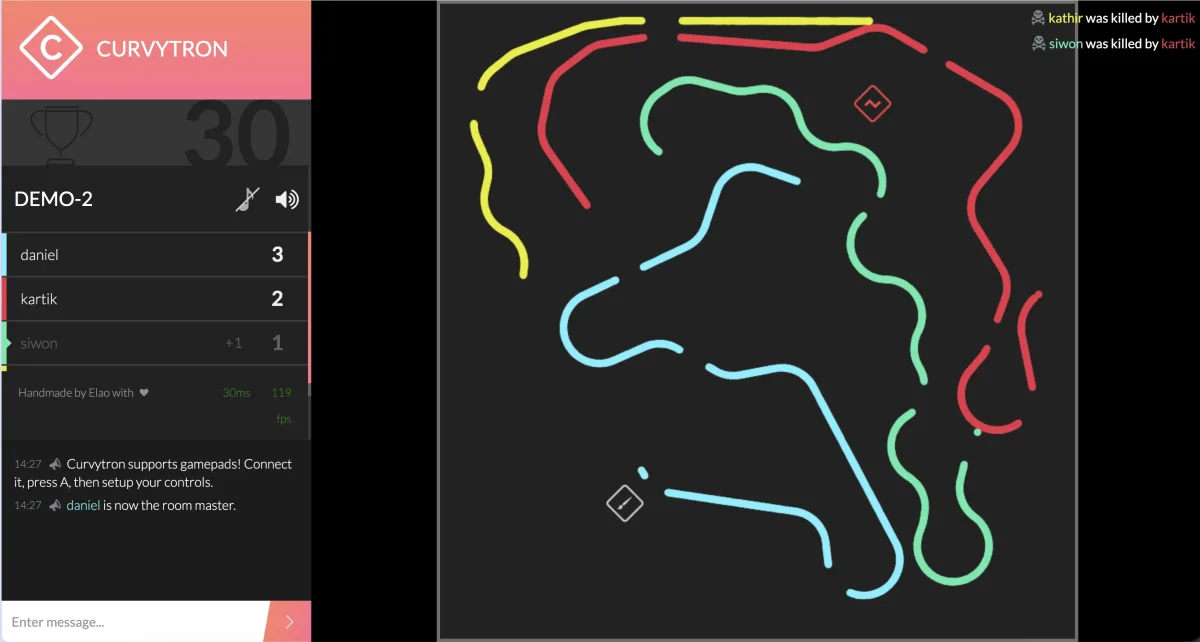
Games also benefit when state stays in memory to preserve progress and reduce lag. Sticky Sessions can support multiple concurrent rooms, with the fleet scaling according to active room count. Modal points to Curvytron, its multiplayer game deployment, as an example: players share a room in real time, and the service adjusts capacity as rooms come and go.
The practical shift is that serverless routing can now preserve process affinity across reconnects while retaining session-level autoscaling. For teams building stateful interactive services, the key design question becomes how many sessions each container should handle and how long each session should remain active.