Creating Custom Agents with OpenAI's Agents SDK and Modal Integration
- Gate
- Generative AI
- Departs
- Crew
- Richard Johnson
- Passengers
- 821
OpenAI's new Agents SDK enables developers to build tailored coding agents and internal tools efficiently, leveraging Modal's powerful sandbox environment.
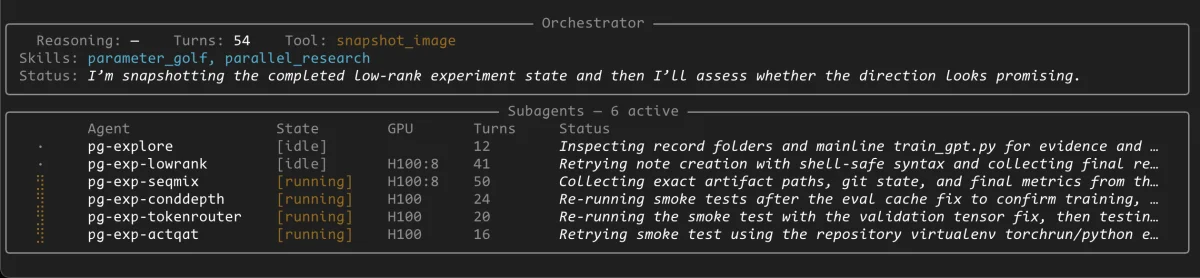
The recent launch of the OpenAI Agents SDK offers a versatile framework for developing coding agents tailored to specific organizational needs, akin to how companies like Ramp have effectively implemented background coding agents on Modal. These agents can significantly streamline workflows by taking on tasks such as coding, deep research, and other automation processes, thus enhancing productivity.
With existing tools like Codex and Claude Code gaining popularity, many businesses are now eager to leverage more customized solutions integrated into their ecosystems. The OpenAI Agents SDK provides an ideal foundation for teams wishing to develop bespoke agent systems that offer the flexibility of in-house development.
The integration of the SDK into Modal through a sandbox extension allows these agents to operate on dedicated computing environments, significantly enhancing their capabilities by utilizing Modal's robust infrastructure. In this article, we'll guide you through constructing a custom agent harness from the ground up on the OpenAI Agents SDK and integrating it with Modal to develop a general-purpose coding harness capable of executing massive parallel computing tasks.
Building Basic Agents
We'll kick off by creating a minimal coding agent using the OpenAI Agents SDK. Although this approach is foundational and comes with certain risks, it serves as an effective introduction to building functioning agents.
def exec(command: str) -> str:
    """Execute a shell command on the host machine."""
    result = subprocess.run(command, shell=True, capture_output=True, text=True)
    return result.stdout + result.stderr

agent = Agent(
    name="Coding Agent",
    instructions="You are a helpful coding assistant.",
    tools=[exec],
)

result = Runner.run_sync(agent, "Use npm to install dependencies")
print(result.final_output)
Here, we define a coding agent that utilizes a simple function to execute shell commands on the host environment. It's crucial to note that while straightforward, running arbitrary commands can lead to potential security vulnerabilities if not carefully managed. A malicious prompt could prompt the agent to execute harmful commands that compromise your system.
Enhancing Security with Sandboxing
To mitigate these risks, we can transition the agent into a sandboxed environment, creating isolated Linux environments achieved through VMs or containers. This practice permits the coding agent to execute tasks within these secured environments instead of directly on the host system, significantly reducing the potential for misuse.
The OpenAI Agents SDK supports the creation of a SandboxAgent class that inherits from the base Agent class. This SandboxAgent is equipped with pre-installed tools to connect and communicate with a remote sandbox. Incorporating the ShellTool increases the inability of commands executed to harm the host environment.
class WorkspaceShellCapability(Capability):
    def bind(self, session: ModalSandboxSession) -> None:
        self._session = session

    def tools(self) -> list[Tool]:
        return [ShellTool(executor=self._execute_shell)]

    async def _execute_shell(self, request: ShellCommandRequest) -> ShellResult:
        # Runs each command inside the bound sandbox, returning stdout/stderr
        ...

async def main(prompt: str):
    modal_client = ModalSandboxClient()
    modal_options = ModalSandboxClientOptions(
        app_name="my-agent",
        gpu="A10",  # optional: attach a GPU to every sandbox this client creates
    )

    agent = SandboxAgent(
        name="Coding Agent",
        instructions="You are a helpful coding assistant.",
        capabilities=[WorkspaceShellCapability()],
    )

    result = await Runner.run(
        agent,
        prompt,
        run_config=RunConfig(
            sandbox=SandboxRunConfig(client=modal_client, options=modal_options)
        ),
    )
    print(result.final_output)
Training with One-Shot Prompts
As a practical demonstration of the agent harness, it can train a model on the MNIST dataset through a one-shot prompt:
uv run main.py --prompt "Implement and train a model on the MNIST dataset using pytorch"This task should execute without issues, completing the model training in a controlled environment through the flexible capabilities of the sandboxed agent.
Constructing an Advanced Agent Harness
In creating a powerful agent harness, it's important to focus on the surrounding architecture the agents will utilize. This involves careful consideration of features that improve their functionality while ensuring ease of use and integration.
Building Memory with Sessions
By default, agents operate statelessly; thus, when a run method receives a user prompt, it does not retain memory of prior interactions. However, stable performance across multiple user prompts can be significantly improved using sessions that facilitate context retention.
session = SQLiteSession(session_id="my-session")

while True:
    user_input = input("> ")
    result = await Runner.run(agent, user_input, session=session)
    print(result.final_output)
This implementation permits the accumulation of context over multiple interactions, allowing the agent to maintain an ongoing conversation with a clearer contextual framework, which improves its effectiveness.
Integrating Subagents for Complex Tasks
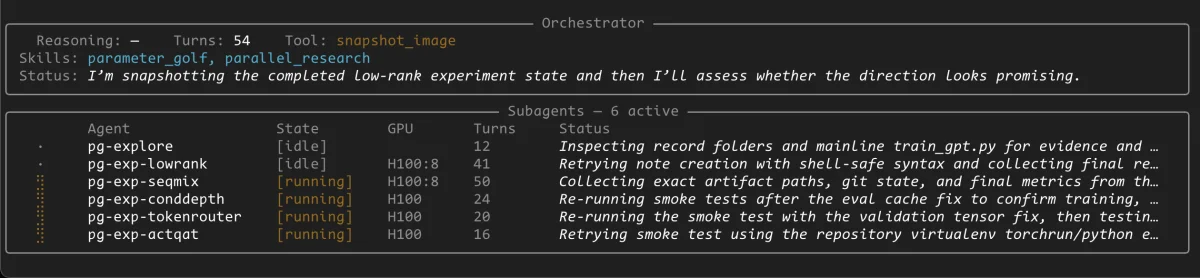
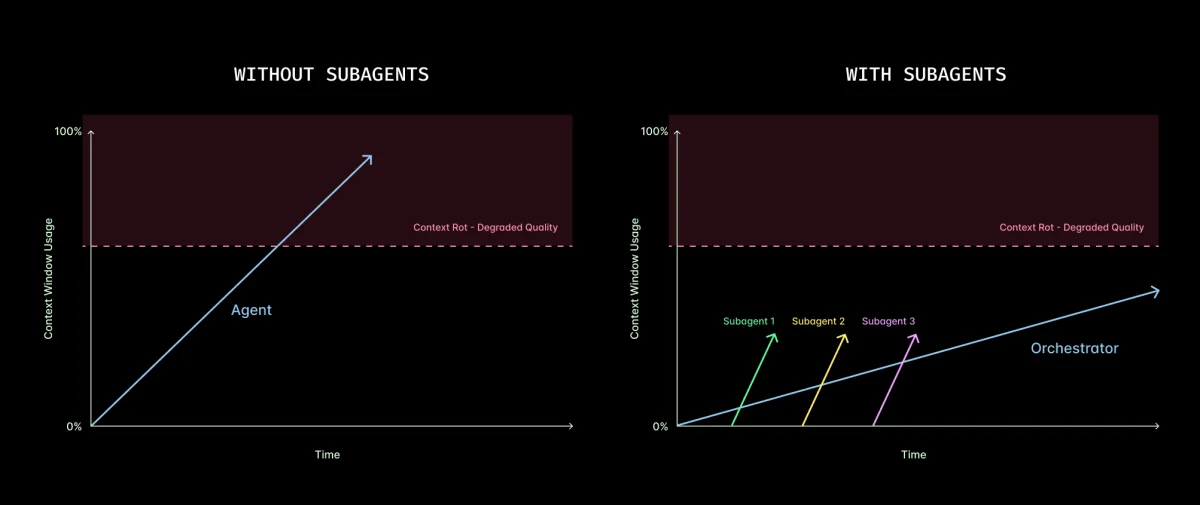
Implementing an orchestrator agent can enhance the system further. The orchestrator manages memory for an entire project and delegates tasks to subagents when necessary. This allows for increased specialization and execution control among different agents.
class OrchestratorAgent:
    def __init__(self, model, sandbox_client, sandbox_options):
        self._pool = SubAgentPool(client=sandbox_client, options=sandbox_options, model=model)

        async def spawn_subagent(agent_name: str, objective: str) -> str:
            entry = await self._pool.create(agent_name, objective)
            return f"Subagent '{agent_name}' spawned with id={entry.id}"

        async def invoke_subagent(agent_id: str, prompt: str) -> str:
            entry = self._pool.get(agent_id)
            result = await Runner.run(
                entry.agent, prompt,
                session=entry.conv_session,
                run_config=RunConfig(sandbox=SandboxRunConfig(client=sandbox_client)),
            )
            return result.final_output

        self._agent = Agent(
            name="Orchestrator",
            instructions="Delegate coding tasks to subagents.",
            tools=[
                function_tool(spawn_subagent),
                function_tool(invoke_subagent),
                function_tool(self.finish),
            ],
        )
This orchestrator can manage multiple concurrent tasks, enhancing throughput and efficiency as it can spawn subagents to tackle specific elements of a larger coding project.
Managing Resource Limitation with GPU Quotas
To maintain operational control over GPU resources, implementing a quota system is highly beneficial. This ensures that the orchestration does not exceed the available computational resources while executing parallel tasks.
GPU_LIMITS: dict[str, int] = {
    "H100": 8,
    "H100:8": 2,
}

async def create(self, agent_name, objective, gpu=None) -> SubAgent:
    if gpu is not None:
        limit = GPU_LIMITS.get(gpu)
        if limit is not None:
            in_use = sum(1 for e in self._entries.values() if e.gpu == gpu)
            if in_use >= limit:
                raise ValueError(gpu)
    # Additional code for creating a subagent
This implementation ensures a stricter control over resource allocation while maximizing efficiency across concurrent tasks being managed by the orchestrator.
Filesystem Snapshots for Efficiency
Another innovative approach is to implement a filesystem snapshot feature. This allows a running sandbox to be frozen into a stateful image, significantly reducing redundant setups for new subagents that might otherwise have to repeat costly initialization processes.
async def snapshot_image(self, agent_id: str, label: str) -> str:
    entry = self._pool.get(agent_id)
    image_id = await entry.modal_session.snapshot_filesystem()
    self._image_registry[label] = image_id
    return f"Snapshot complete. label={label!r} image_id={image_id}"
By referencing these snapshots during the spawning of new subagents, this feature decreases setup time and allows new agents to skip straight into productive work without facing the context bloat of entire session histories.
Conclusion
With the development of a complete agents system leveraging the OpenAI Agents SDK and Modal, we've created a framework for parallel, autonomous computation catered to various coding tasks. The framework allows for an extensive range of functionalities, from basic coding tasks to complex orchestration of projects across multiple agents. The modular nature provided by the SDK encourages creativity in system design, enabling developers and organizations to tailor their agent interactions effectively.
As you develop your agent systems for Parameter Golf experiments or similar applications, remember to refer to the full example repository for resources and examples. The combination of tools from OpenAI and Modal not only streamlines computational tasks but also unlocks new potential in the automation of various coding processes.
By building upon these concepts, there's no limit to what custom systems can achieve—be it in research, software engineering, or beyond, the possibilities are expansive.